Many businesses have product photos but no clear idea how to turn them into engaging video ads. Clone video ads offer a practical starting point: users can take a successful ad as inspiration and adapt its hook, scene flow, and presentation style to their own products.
With Pollo AI Clone Video Ads, users can provide a reference ad along with product images or a product link to create a new product-focused video. The quality of the result depends largely on choosing the right reference and providing clear product information.
What Are Clone Video Ads and Why Choose Pollo AI?
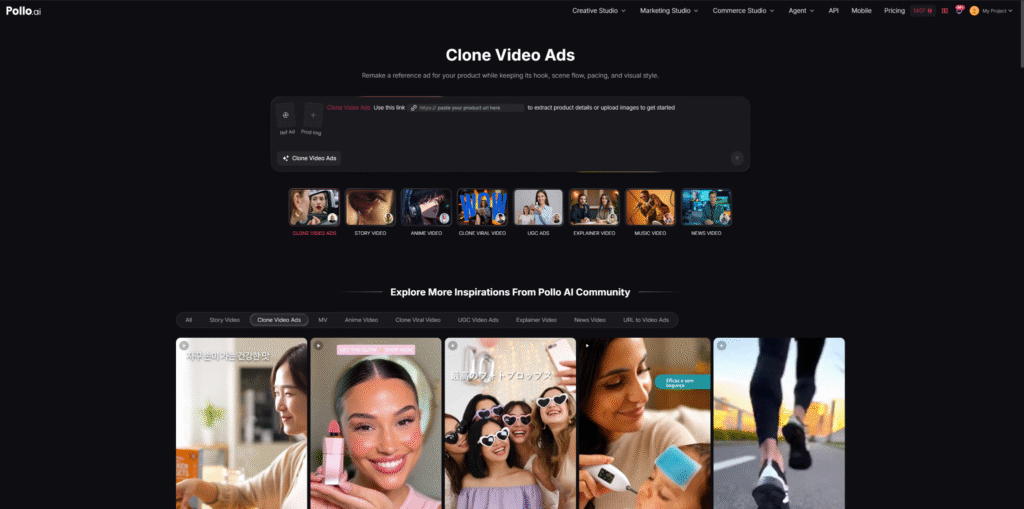
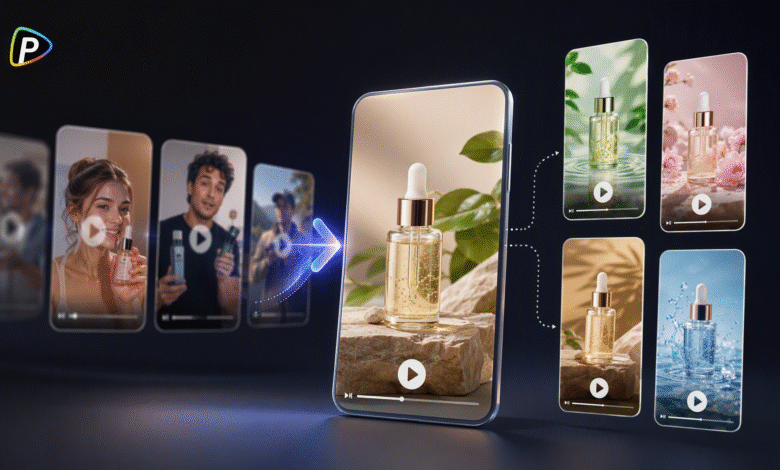
Clone video ads use an existing advertisement as a creative reference for a new product video. Rather than copying the original ad exactly, they adapt its hook, scene flow, pacing, and presentation style to a different product.
For example, a reference may introduce a common problem, present a product, show how it works, and highlight the result. That structure can be reused while changing the product, visuals, and message. This gives businesses a clearer starting point when they need new ad ideas but do not want to plan every scene from scratch.
Clone Video Ads from Pollo AI supports this workflow by allowing users to select an ad from its library or upload a reference video, then add their own product image or product link. The reference provides the creative direction, while the supplied product information is used to build the new ad.
This can help ecommerce sellers and small businesses explore different advertising formats without creating every concept from the beginning. The following steps explain how to choose a suitable reference, prepare product materials, and create a more useful product ad.
How to Create Product Ads with Clone Video Ads
Step 1. Choose a Reference That Fits the Product
Do not select a reference only because it is popular. Its structure should suit the product and the way customers are likely to understand it.
Before using a video, identify how it presents the product. Does it begin with a problem, show the product immediately, or use a demonstration or customer-style review? A cleaning product may suit a problem-and-solution format, while clothing may work better in a styling or transformation video.
Simple references are usually easier to adapt, whether users are working with Clone Video Ads or the Renderforest AI video generator on Pollo AI. Videos with many characters, rapid cuts, or complex effects may produce less consistent results.
Step 2. Add Clear Product Images or a Product Link
Users can upload product images or provide a direct product link in Pollo AI Clone Video Ads.
Images should clearly show the product’s appearance, color, packaging, and important features. Avoid mixing different models or versions unless they are all intended to appear.
A product link should lead directly to the relevant product page rather than a homepage or category page. Before generating the video, users should check that the product images and descriptions are accurate. Incomplete or inconsistent information may lead to incorrect details in the final ad.
Step 3. Set the Main Direction for the Ad
The reference should guide the format, but the new video still needs to focus on the product’s own benefits.
Users should explain what they want to keep and what they want to change. For example, they may retain the reference’s fast opening and product-demo format while highlighting a different use case.
A short, specific instruction is usually more useful than a long list of requirements. It should identify the product, the main benefit, and the desired presentation style. Avoid conflicting instructions that pull the video in different directions.
Step 4. Check the Product and Message
After generating the video, users should first check whether the product looks correct. Its shape, color, packaging, and key features should match the supplied materials.
They should also review the opening. If the product or customer problem is unclear during the first few seconds, the ad may be difficult to understand.
If the product is inaccurate, users can replace unclear images, simplify the requested scenes, or revise the instructions before generating another version.
Step 5. Test a Few Focused Variations
One video may not suit every audience or platform. Users can create several versions by changing the hook, product benefit, or reference style.
It is best to change one major element at a time. If the hook, message, pacing, and visual style all change together, it becomes difficult to identify what makes one version more effective.
Step 6. Prepare the Video for Its Final Use
Before publishing, users should check whether the video fits the intended platform. Short social media ads may need a faster opening, while product pages may benefit from clearer demonstrations.
Text should be readable, and the call to action should match the campaign. A successful reference can provide a useful structure, but the final ad still needs to fit the product and audience.
Conclusion
Clone video ads help businesses turn successful advertising ideas into new product videos without developing every concept from scratch. By combining a suitable reference with accurate product materials, users can test different hooks and presentation styles more efficiently.
Pollo AI Clone Video Ads supports this workflow by allowing users to combine reference ads with product images or links. Better results usually come from choosing a relevant reference, providing clear product information, and reviewing each video before publication.