Most retail POS decisions go wrong before the first transaction. If you’re evaluating Heartland retail POS, you need to understand exactly what you’re getting — and what you’re not — before you commit to a deployment. It’s a cloud-based, open-source platform built specifically for small to mid-sized retail operations, not restaurants, not hospitality. The question isn’t whether it’s a “good” system. The question is whether it fits your workflow, your hardware, and your payment processing setup.
What the Platform Actually Is
Heartland Retail POS runs in the cloud. The software itself is free to download — it’s open-source. That’s the first thing that surprises most store owners. Paid support and hosting come through third-party partners, not Heartland directly, which matters when something breaks at 6pm on a Friday before a weekend sale.
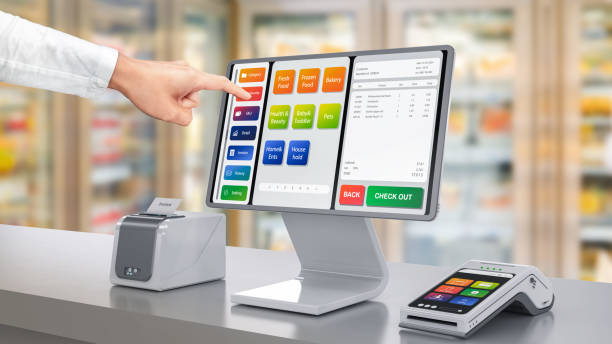
The system handles multi-location inventory, employee access control with role-based permissions, and integrates with Heartland Payment Processing for EMV-compliant transactions. No proprietary hardware lock-in — it works with standard barcode scanners, receipt printers, and cash drawers you likely already own or can source cheaply.
One thing worth knowing: this platform has nothing to do with SkyTab or Shift4. Those are restaurant systems. Heartland Retail POS is its own product, built for product-based retail. If someone tries to sell you a hospitality-focused system for your clothing boutique or hardware store, walk away.
Hardware Setup — Where Most Deployments Stumble
No proprietary hardware sounds great. And it mostly is. But “supports standard hardware” doesn’t mean plug-and-play every time.
Two issues show up repeatedly in deployment logs:
- Barcode scanner configuration failures — usually traced to device settings mismatches, not the scanner itself. Check your device settings log first before assuming the scanner is defective.
- Receipt printer driver mismatches — these surface in system logs and typically require a firmware update or full driver reinstall per the official deployment guide. Don’t skip the firmware check during initial setup.
Before you go live, run this quick hardware verification:
- Confirm your barcode scanner model is in the supported device list
- Download the latest firmware for your receipt printer
- Test a full transaction cycle — scan, payment, receipt — before opening day
- Check system logs after the test run for any driver warnings
If you skip this, you’ll find out about the problem mid-rush. That’s not a fun conversation with a line of customers waiting.
Inventory Management: What It Does Well
This is where the platform earns its keep for retail. Multi-location inventory syncs in the cloud, meaning your downtown location and your suburban store pull from the same data. Stock levels update in real time as transactions process.
During a busy Saturday morning, your staff can check whether a specific SKU is available at another location without picking up a phone. The system tracks inventory movement across locations and flags discrepancies. For stores running frequent promotions or seasonal restocks, that visibility matters more than most people realize until they’re staring at a stockout they didn’t see coming.
Edge case worth flagging: if your internet connection drops mid-transaction, verify your offline fallback settings before assuming data syncs correctly when connectivity restores. Cloud-based systems have a dependency — know your contingency before it becomes an incident.
Payment Processing Integration
Heartland Payment Processing is the native integration. EMV-compliant, which means chip cards, contactless payments, and standard swipe all route through the same terminal without additional configuration headaches. The integration is tight because it’s built-in — you’re not duct-taping a third-party processor onto a system that doesn’t want to cooperate.
That said, payment processing fees aren’t fixed. They vary by contract, transaction volume, and card type. Don’t assume you’re getting a standard rate — get the actual fee schedule from your processing agreement before you sign. Interchange-plus versus flat-rate structures hit differently depending on your average ticket size and card mix.
One operational check: after your first week of live transactions, pull your processing report and reconcile it against your POS sales report. Duplicate authorizations happen — rare, but they happen. Catch it in week one, not in month three when you’re trying to untangle the discrepancy.
Employee Access and Reporting
Role-based permissions are configurable. That means you decide who can process refunds, who can apply discounts, and who only has access to their own register. Set these permissions before your first employee logs in — retrofitting access controls after staff have already been operating in a system is messier than it should be.
Sales reporting pulls from cloud data, so you can run end-of-day reports from anywhere. The standard reports cover sales by period, by employee, by SKU, and by location. If you need something more granular — say, margin analysis by product category — check whether your third-party support partner has configured those custom reports, because out-of-the-box reporting covers the basics but may not go as deep as your accountant wants.
At 9pm close, your manager should be able to pull the daily sales summary, check for any voided transactions that look off, and flag anything unusual before the register is counted. That workflow takes minutes if reporting is configured correctly. If it takes 30 minutes, your setup needs work.
Support Structure — Know What You’re Getting Into
This is the part most store owners gloss over during evaluation. Heartland doesn’t provide direct support for the retail POS platform — that runs through third-party partners. Which means your support quality depends entirely on who you contract with.
Ask these questions before you finalize anything:
- What’s the response time SLA for a system-down scenario?
- Do they offer on-site support or only remote?
- How are software updates handled — automatic, manual, or partner-managed?
- Who do you call at 8am on a Monday when transactions won’t process?
I’ve seen retailers sign up for a system based on the software features and completely ignore the support layer. Then something breaks — always at the worst possible moment — and they’re stuck waiting in a ticket queue while the store is open. Don’t be that person.
Is This the Right POS for Your Store?
Heartland Retail works well for stores that need a cost-effective, cloud-based solution with solid inventory management across one or multiple locations, without getting locked into proprietary hardware. The free software cost removes a barrier that stops a lot of small retailers from upgrading their systems.
The catch is the support structure. If you’re not comfortable managing third-party relationships for technical issues, or if you need guaranteed response times backed by a direct vendor contract, you need to factor that into your evaluation.
For retailers who want a deeper look at the full ecosystem — hardware compatibility, processing rates, and what a realistic deployment looks like — reviewing the Heartland POS system options from an experienced reseller gives you a clearer picture than the marketing materials alone.
The right POS decision comes down to three things: does it handle your inventory correctly, does it process payments reliably, and can you get support when it breaks. Evaluate all three before you sign anything. The software being free doesn’t mean the total cost of ownership is zero — support, hardware, and processing fees are where the real numbers live.