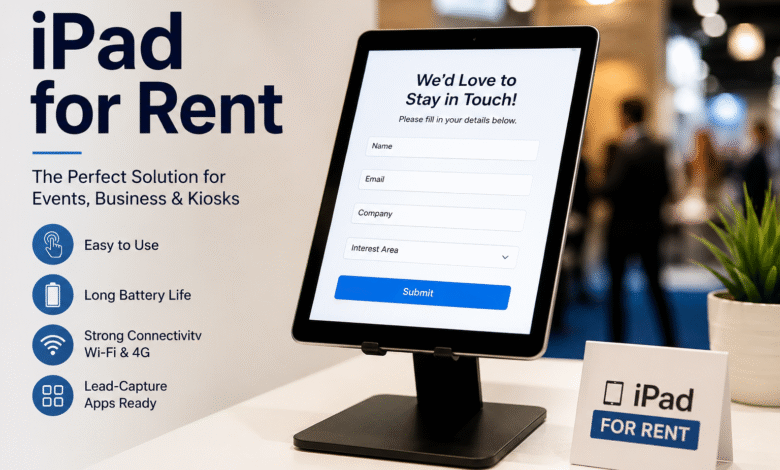
An iPad for rent works best for lead-capture kiosks because it combines a familiar touchscreen interface, long battery life, strong Wi-Fi and 4G connectivity, and access to purpose-built lead-capture apps, all without the upfront cost or long-term commitment of buying hardware outright. For short events, rentals also come with configuration, stands, and support included, so the kiosk is ready to use the moment it arrives.
Thinking about setting up a lead-capture kiosk for your next trade show, retail launch, or office reception? An iPad for rent is usually the fastest and most cost-effective way to get a kiosk running without sinking money into hardware you’ll only use for a few days. iPads are lightweight, familiar to almost everyone, and reliable enough to run for eight or ten hours straight without freezing up or draining halfway through the day. That combination of trust and stability is exactly what a lead-capture kiosk needs to actually convert visitors into contacts.
What Is a Lead-Capture Kiosk?
A lead-capture kiosk is a self-service or staffed touchscreen station set up to collect visitor details such as name, email, company, and interest area, usually in exchange for a demo, a giveaway, or entry into a prize draw. You’ll see them at trade show booths, retail pop-ups, conference registration desks, and even office lobbies where a receptionist wants a quick way to log visitor information. The kiosk replaces paper sign-up sheets and business card bowls with something that syncs straight into a CRM or spreadsheet, cutting out manual data entry and typing errors.
Why iPads Are the Best Choice for Lead-Capture Kiosks
Most people already know how to use an iPad without being told. That familiarity matters at a busy event, where a visitor won’t stop to figure out an unfamiliar interface. Tap, type, done. iPads also run smoothly for hours on a single charge, which means staff aren’t scrambling to find a charger mid-afternoon, and the App Store has a wide range of lead-capture and form-building apps built specifically for iOS, many of which support offline data collection when Wi-Fi at a venue is patchy.
Build quality plays a role too. iPads are solidly built, the screens respond accurately even with dozens of taps an hour, and the cameras are sharp enough for badge scanning or quick photo capture at registration desks. None of that is guaranteed with a budget Android tablet, and a laptop simply isn’t designed for someone to walk up and use standing at a counter.
Renting Instead of Buying Makes the Numbers Work
Buying enough iPads to cover a busy events calendar rarely makes financial sense, especially if devices only get used a handful of times a year. Working with a specialist supplier such as Tablethire means the devices arrive already set up with kiosk mode enabled, the right apps installed, and a stand ready to go, so there’s no lead time spent configuring hardware before an event. It also means the equipment gets refreshed regularly, so you’re never stuck running an older, slower model that lags under heavy use.
Where iPads Work Best for Lead Capture
1. iPad for Rent for Events
Trade shows and pop-up activations are where kiosks earn their keep the most. Renting an iPad for rent for events means you can scale up quickly for a three-day exhibition, run it in kiosk mode so visitors can’t wander off into other apps, and hand the device back once the event closes without worrying about storage or resale. Booth traffic is unpredictable, so having a device that just works, without a learning curve, keeps the queue moving and keeps visitors from walking off before they’ve filled in their details.
2. iPad for Rent for Business
Retail counters, product launches, and pop-up shops all rely on quick capture of customer details for loyalty programs, waitlists, or follow-up marketing. An iPad for rent for business gives a retailer a professional-looking checkout or sign-up point without the capital outlay of buying tablets for a temporary campaign. Once the promotion wraps, the kit goes back, and there’s nothing sitting in a stockroom gathering dust.
3. iPad for Rent for Conferences
Registration desks at conferences see a burst of activity in the first hour and then steady traffic throughout the day. An iPad for rent for conferences handles badge printing integration, session check-ins, and lead retrieval for exhibitors, often across ten or twenty devices at once. Renting in bulk for a single event is far more practical than a conference organiser purchasing and storing dozens of tablets that only get used once or twice a year.
iPad vs Other Devices for Lead Capture
| Feature | iPad Rental | Android Tablet | Laptop | Paper Forms |
| Setup time | Minutes, pre-configured | Varies by model | Slower, more clicks | None, but slow to process |
| Battery life | 8-10 hours typical | Inconsistent | 4-6 hours | N/A |
| User familiarity | Very high | Moderate | High but not kiosk-friendly | High, but manual |
| Data accuracy | High, structured fields | High | High | Low, handwriting issues |
| Upfront cost | None (rental) | Purchase or rental | Purchase | Minimal |
| Ideal for short events | Yes | Sometimes | Rarely | Not recommended |
How to Set Up an iPad Lead-Capture Kiosk in 5 Steps
1. Choose your lead-capture app. Pick software that supports offline storage, custom fields, and CRM export in the format you need.
2. Enable guided access or kiosk mode. This locks the iPad to a single app so visitors can’t exit to the home screen or browse other content.
3. Attach a stand or enclosure. A countertop or floor stand keeps the device stable and at a comfortable angle for standing visitors.
4. Test connectivity on site. Check Wi-Fi strength or confirm the device has a working 4G data plan before doors open.
5. Assign someone to monitor the kiosk. Even self-service stations benefit from a staff member nearby to answer questions and keep the queue moving.
Frequently Asked Questions
1. What is the best device for a lead-capture kiosk?
An iPad is generally the best choice because of its long battery life, familiar interface, and wide range of compatible lead-capture apps that support offline data collection.
2. How much does it cost to rent an iPad for a kiosk?
Costs vary by rental length, model, and accessories such as stands or SIM cards, but short-term event rentals are almost always cheaper than purchasing new hardware outright.
3. Can I lock an iPad to a single app for a kiosk?
Yes. Apple’s Guided Access and Mobile Device Management (MDM) tools let you restrict an iPad to one app, preventing visitors from exiting to the home screen.
4. Do rented iPads come with data plans for events without Wi-Fi?
Many rental providers offer iPads with built-in 4G SIM cards for venues where Wi-Fi is unreliable or unavailable.
5. How many iPads do I need for a conference registration desk?
It depends on expected footfall, but a common rule of thumb is one device per 100 to 150 attendees during peak check-in periods.
6. Is renting an iPad cheaper than buying for a one-off event?
For a single event or short campaign, renting is almost always cheaper once you factor in setup, storage, insurance, and eventual resale value of purchased hardware.
Final Thoughts
A lead-capture kiosk only works if visitors actually use it, and that comes down to picking a device people trust without thinking twice. iPads tick that box better than any alternative on the market right now, and renting one removes the cost and hassle of owning hardware that sits idle most of the year. For businesses that run events, conferences, or retail activations regularly, working with an established supplier like Tablethire takes the guesswork out of sourcing, configuring, and supporting the devices, so the only thing left to worry about is the queue at your kiosk.