Every growing business eventually hits the same wall. Processes that worked for a team of 20 start to strain at 200. Approvals get buried in email threads, field teams juggle disconnected apps, and customers wait while someone re-enters the same data into yet another system.
Most leaders respond by asking for a mobile app. That instinct is right, but the real work happens beneath the screen. A mobile experience can only be as simple as the system behind it is well designed.
This is where many digital investments fall short. An app looks polished at launch, then slows down, breaks, or becomes painful to update as usage grows. The most effective custom mobile application development services avoid this by starting with how the business actually operates, not how the screens look.
Why Enterprise-Grade Applications Matter for Long-Term Growth
Enterprise-grade applications are built to absorb growth rather than resist it. They let you add users, locations, and services without rebuilding every few years.
Poorly architected software does the opposite. A small change in one feature breaks something unrelated. Customer data lives in systems that never quite agree. The app crawls at peak hours, and staff invent spreadsheet workarounds that slowly become permanent.
These problems rarely appear at launch. They surface just as the business is ready to scale.
Architecture also determines whether you can benefit from automation. Many organizations are exploring custom AI software development services to eliminate repetitive work, but AI can only act on data that is clean, connected, and accessible. Without the right foundation, even a capable model ends up automating the chaos.
What Defines an Enterprise-Grade Application
Enterprise-grade is a term used loosely. In practice, it describes software that keeps performing as your business changes. Five qualities set it apart.
Scalability
Scalability means the app can handle ten times the users, transactions, or locations without a rebuild. Think of a highway built to add lanes without closing the road.
Security
Mobile apps carry sensitive data into unpredictable places, from client sites to public Wi-Fi. Enterprise-grade security includes role-based access, encryption, audit trails, and remote wipe for lost devices, plus compliance with requirements like HIPAA or SOC 2 where they apply. Security works best when it is built in from the start, not added later.
Performance
Users judge an app within seconds. If screens load slowly, people abandon the task or drift back to manual processes. Performance should be tested under real conditions, including weak signals, older devices, and peak traffic.
Reliability
Reliable software stays available and fails gracefully when something goes wrong. For a technician in a basement with no signal, an offline mode that syncs later separates a completed job from a return visit.
Integration Capabilities
A mobile app is usually the front door to your CRM, ERP, payment platform, and accounting tools. Strong integrations, built through APIs (the connectors that let systems share data), allow a single tap to update several systems at once. That is the secret behind most simple mobile experiences.
Key Pillars for Long-Term Growth
Modular Architecture: Microservices vs. Monolith
A monolith is an application built as one large, interconnected block. It is faster to launch but harder to change, since changing one part often means retesting and releasing the whole system.
Microservices split the application into independent pieces, such as scheduling, payments, and notifications. Each can be updated or scaled on its own, so a surge in payments does not slow down scheduling.
Microservices are not always the right starting point. For many growing companies, a modular monolith, meaning one application with clearly separated sections, works better, provided those sections can be split out later. The real goal is avoiding tangled code that locks the business into its current shape.
Cloud-Native Development
Cloud-native applications are built from the ground up for cloud platforms like AWS, Microsoft Azure, or Google Cloud. They can scale automatically with demand, so you pay for computing power the way you pay for electricity. For businesses with seasonal peaks or fast expansion plans, that flexibility protects both performance and budget.
Data-Driven Decision Making
Every action in a mobile app can generate useful data: when a task started, where it stalled, how long an approval took. When data collection is planned early, those signals feed dashboards that reveal exactly where workflows break down, so leaders can fix what actually costs time.
Automation and AI Readiness
AI readiness does not mean adding AI features immediately. It means consistently structured data, secure APIs, and workflows that can trigger automated actions. With that groundwork, capabilities like automatic approval routing, demand forecasting, or reading scanned documents become upgrades rather than rebuilds.
Common Mistakes Businesses Make
A Short-Term Development Mindset
Choosing the fastest or cheapest build feels efficient, but shortcuts create technical debt, the hidden cost of quick fixes. Like high-interest credit, it makes every future change more expensive.
A related trap is digitizing a broken process. Turning a 40-field paper form into a 40-field mobile screen simply moves the frustration to a smaller display.
Ignoring Scalability Early
Many teams plan to “fix it when we grow.” That plan usually backfires, because retrofitting scalability into a live system costs far more than planning for it upfront. Planning for scale is not about overbuilding. It is about early choices that keep growth options open.
Choosing the Wrong Tech Stack
Your tech stack is the set of languages, frameworks, and tools your app is built on. Some companies pick one because it is trending, others because their first developer knew it.
The right choice fits your use case, security needs, the availability of skilled developers, and long-term support. Cross-platform frameworks like Flutter or React Native suit many businesses, while others need separate native apps for iOS and Android.
Best Practices for Building Future-Ready Applications
Strategic Planning Before Development
Before writing any code, map the workflow end to end. Identify who performs each step, where they are, which device they use, and what decision they need to make in that moment.
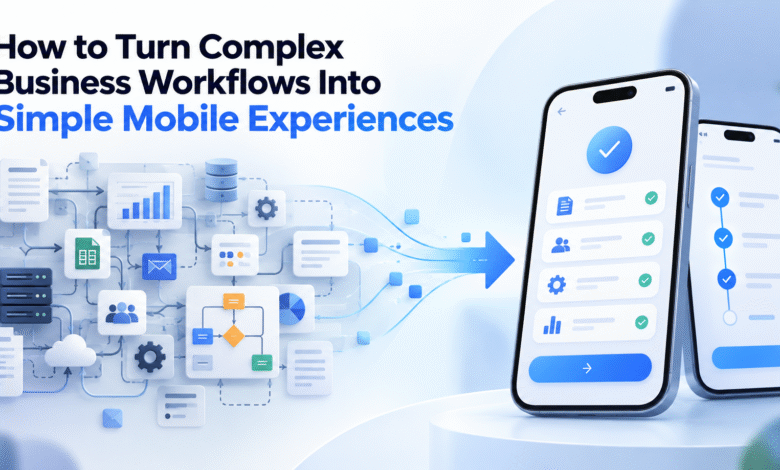
Then simplify before you digitize. Cut redundant approvals, eliminate duplicate data entry, and let the system auto-fill what it already knows, like location, date, or customer history. Design each screen around a single job, and show each user only what their role requires. This is how a complicated process becomes a few simple taps.
Finally, define success in measurable terms, such as time per task, error rates, and user adoption.
Choosing the Right Development Partner
The right partner asks about business goals before features. Look for a team that explains architecture decisions in plain language, can show applications that scaled successfully, treats security as a default, and stays involved after launch. A structured discovery phase before development is a strong sign the partner values getting the foundation right.
Continuous Optimization and Iteration
Launch is the starting line, not the finish line. Begin with a focused release that solves the most painful part of the workflow, then expand based on real usage data and feedback. Automated testing and release pipelines let teams ship improvements often without risking stability.
A Real-World Scenario: Field Service Made Simple
Consider a situation common in field service. A regional HVAC company with about 150 technicians runs on paper work orders and phone dispatch. Office staff retype technician notes into accounting software, so invoices go out days after the work is done.
Its first app simply copies the paper form onto a phone. Technicians find it clumsy and quietly return to paper.
The second attempt starts with workflow mapping. Each job becomes a short guided sequence: accept, check in, capture photos, collect a signature, and close. Behind the scenes, separate services handle scheduling, inventory, and invoicing, connected to the existing accounting software through APIs. The cloud-based platform also works offline and syncs when the signal returns.
The results compound. Invoices go out the same day, and duplicate data entry disappears. When the company acquires a competitor, the platform absorbs the new team without a rebuild. Later, that clean operational data makes AI-assisted route planning a natural next step instead of a major project.
Conclusion
The simplest mobile experiences are rarely simple to build. They are the visible result of careful planning, modular design, cloud-native infrastructure, and clean, connected data.
Businesses that invest in this foundation gain more than a polished app. They gain cheaper updates, faster adoption, clearer visibility into operations, and a practical path toward automation and AI.
Whether you are planning a new application or struggling with one that no longer keeps up, start with workflows and architecture, not features. An early review with experienced architects is often the most valuable investment in the project. It is the difference between an app you replace in three years and a platform that grows with your business.