School noticeboards punish guesswork more than they punish cheap paper. A parents-evening timeline has to fit the board you already have, survive a week of bags brushing it, and come down without a reprint invoice. A rasterbator tiled PDF is one way to hit that measured box on an ordinary office printer. It is not the only way, and it is not free of labor.
Office staff usually compare three paths: send a file to a print shop, enlarge the image in Word or a photocopier, or split one image across labeled sheets at home. The shop looks tidy until a corner gets torn and the reprint quote arrives. The Word enlarge looks fine on screen and then crops the year labels. The tiled path wins when you need a stated width and the option to reprint one ruined sheet. It loses when nobody has an hour to trim.
Three Ways To Cover A School Noticeboard
The decision is not “which app looks modern.” It is which path survives a taped outline on a real board. Measure the usable width and height first, including the frame lip. Then ask how you will replace one damaged panel on Thursday afternoon, when the event is Friday.
Print shops sell a single photographic sheet. That is the right buy when the wall is a long-term display and the budget already includes mounting. It is the wrong buy when the same graphic will change next term, or when a chair scuffs one corner and you cannot wait for a courier. A shop file also tends to arrive as one piece. If the board is taller than the delivered sheet, staff start a second order instead of adding a row of paper they already own.
Score Size Reprint And Privacy Side By Side
Put the three paths on the same three tests: does the finished size match the board, can you replace one sheet, and does the photo have to leave the school machine.
| Path | Finished size | One ruined sheet | Where the file goes |
| Print shop | You order a stated size | Usually a full reprint and a wait | Vendor queue |
| Word or copier enlarge | Guesswork; Fit often crops labels | Easy to reprint, hard to match | Stays local if you never upload |
| Tiled PDF on the school printer | Exact size or a chosen sheet grid | Reprint that labeled page | Stays in the browser on this machine |
The table is a procurement score, not a feature list. If the board is 120 cm wide and the graphic must not spill onto the fire notice, “looks big enough” is not a size.
Reprint One Ruined Sheet Without A Shop
A tiled poster is one image divided across ordinary sheets. Each PDF page is one tile. If a bag tears sheet B2, you print B2 again. You do not reorder the whole wall. That is the cost argument against a shop for termly displays: the first print may take longer to assemble, but the repair is a single page.
Word enlarge can also reprint a page. The catch is matching. Without cut guides and a stated grid, the second copy rarely sits on the same marks. Staff then spend the hour aligning by eye, which is how a “quick reprint” becomes rework.
Keep The Photo Off A Vendor Queue
Class photos, student artwork, and staff portraits do not always belong in a print-shop upload. A browser-local tiled export keeps the file on the machine that opened it. That difference is small as policy and large as office practice when staff are choosing between a vendor form and a PDF on the shared printer.
If the school already has a trusted print contract and a data-processing clause, the shop path can still win on finish quality. The tiled path is for the weeks when that contract is the wrong size of hammer.
Exact Size Beats Guessing How Many Sheets
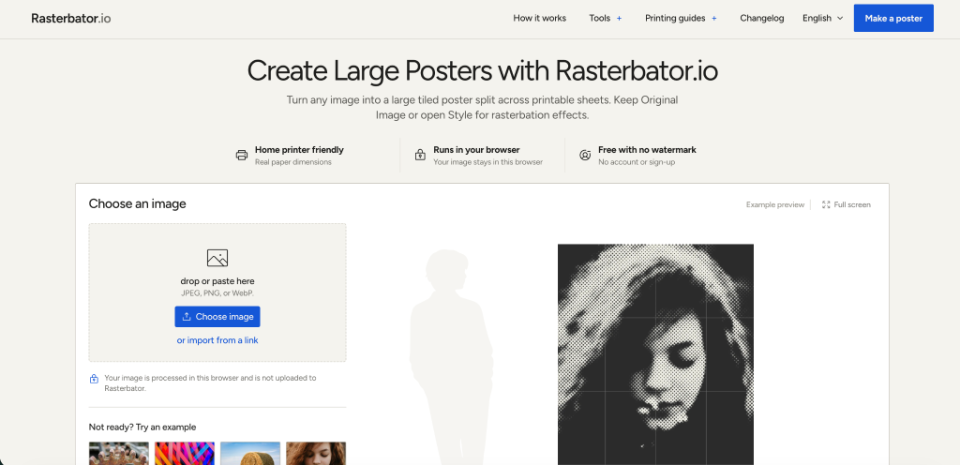
Rasterbator’s Block Poster Maker lets you choose By sheets wide or high, or enter an Exact finished size. By sheets is useful when you only know “three sheets across will fit above the desk.” Exact size is the noticeboard tool: type the width and height in millimetres or inches, then read the page grid and finished bounds in the preview. Summaries may show centimetres when that is easier to read.
A 3-sheet-wide A4 landscape image is a common classroom timeline. A 4 by 3 grid makes a larger wall while staying possible to trim in one prep period. A3 cuts the number of joins for the same finished size if the office printer can take it. Those are starting shapes, not promises that every photo will look sharp at that scale. If the preview’s effective resolution looks thin for a hallway viewed up close, shrink the finished size rather than hoping the shop paper will invent detail.
Enter Width And Height For The Board
Paper size controls each sheet. Exact size controls the assembled result. If you know only one side, derive the other from the image ratio instead of stretching. By sheets always shows the whole image. With Exact size, clear Keep image proportions only when the board ratio differs from the photo. Then choose Show the whole image to keep every edge, or Fill the poster and move the crop. Fill covers the board and can cut year labels off the sides. That crop is a hard miss for a timeline: the first preview looked fine until the 2019 block disappeared.
Print the PDF at Actual Size or 100% on the paper shown in the summary. Fit in the print dialog changes the finished size you just typed. The tool is not a print shop. You still load the paper and press print.
This is where the rasterbator path earns the comparison: you can lock a board measurement before you spend ink, then reprint one labeled page if Friday’s crowd tears a corner.
When Home Tiling Is The Wrong Tool
Skip the tiled path when you need one photographic sheet, laminated edges, or a display that must look like a bought print. Assembly still takes scissors, a ruler, and tape. A large grid can eat a prep period. If nobody on site will trim, the shop is cheaper than a half-finished wall.
Use The Tiled Path Or Skip It
Use Rasterbator when the board has a measured box, the graphic will change, and one ruined sheet must be replaceable the same day. Skip it when finish quality matters more than reprint speed, or when the only available hour is the hour before doors open.
Office staff should pick the path that survives parents evening, not the path that looks most like a poster app. Rasterbator is a free tiled export with no watermark and no account. It still asks someone to measure, print at 100%, and join the sheets. That labor is the price of avoiding a shop reprint.
If the taped outline and the preview bounds agree, print. If they do not, change Exact size or the sheet count before the first full run. A lost hour at the printer is cheaper than a wall that never shipped because the year labels were cropped.