The process of making presentations used to require hours of thinking about the structure, design and content. With the emergence of AI technology (including an amazing AI Presentation Generator called TeraBox), this has completely changed.
In this article, we will discuss how the program operates, its advantages and disadvantages and what it looks like compared to other well-known applications. Ultimately, our objective will be to help readers determine if they should invest in the use of this AI-based presentation creation tool.
What Is TeraBox AI Presentation Maker?
Online Presentation Maker is a tool that creates presentation slides automatically using AI (artificial intelligence). Simply enter a topic description and it will make a complete PowerPoint slideshow in seconds. Users will find this easy to use, fast, and convenient. Students, writers, marketers/business professionals will all benefit from using this tool. You will get a full presentation set up instead of creating a presentation from scratch on your own.
How It Works
There is nothing complicated about how the system works. Every level of user will find the system easy to learn and navigate through.
- Type your concept or thought.
- AI generates an outline.
- Select a design template.
- AI generates slides.
- Edit and export your presentation.
This process usually takes less than a few minutes. Compared to traditional tools, this is a huge time saver.
Key Features That Stand Out
Slide Creation Using AI Is Instantaneous Speed really is the most important advantage of AI in making presentations. If you have an idea, AI can take that idea and turn it into a complete, ready-to-use presentation in less than a minute. This can save you a lot of time when you are pressed for time. Rather than creating your own slides one by one, the AI handles most of that work and allows you to focus on improving the overall content of your presentation.
Intelligent Structuring Content Slides are not created randomly but are outlined logically first; therefore your presentation is easily followed. Writers and other workers will find this feature helpful as it minimizes their effort in arranging their thoughts.
Ready to use, clean design Designing a presentation can be one of the most time-consuming aspects of building your presentation. The TeraBox AI Presentation Maker takes away the challenge of creating designs by providing you with premade templates. These templates are both up to date and very straightforward and can work for most presentation types, ranging from business reports to academic presentations.
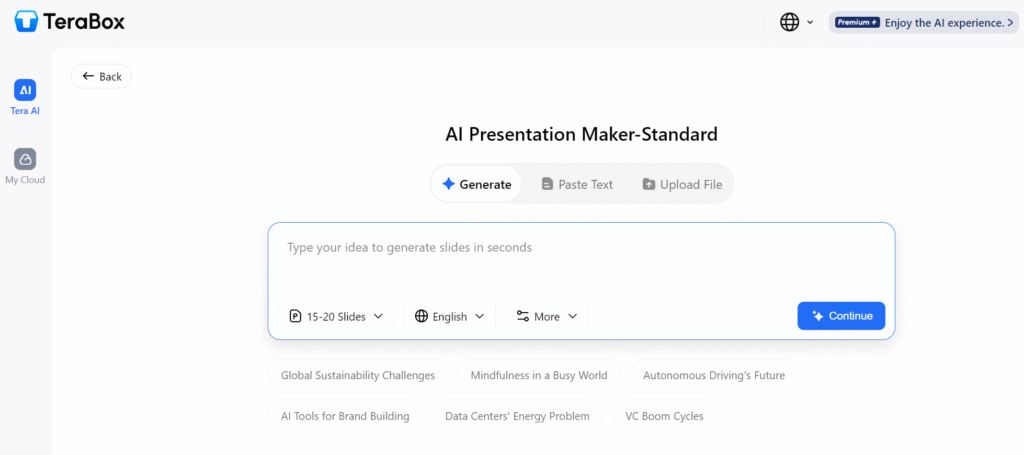
Simple Editing and Customizing Since the slides are auto-generated, you still have complete control over them through your ability to edit the text, change layouts or exchange pictures. The combination of automation and flexibility provides your presentation with a personalized feel rather than a generic one.
Language support Language support is another area where the app excels. Presentations can be produced in several different languages. Global teams and content creators that work with an international audience will benefit from this feature.
Cloud Integration. Since it is part of the TeraBox ecosystem, your files can be stored and accessed easily. You do not need to worry about losing your work.
Advantages of TeraBox AI Presentation Maker
Saves Time
The time-saving factor is an obvious advantage that you will notice; something that once took hours can now be accomplished in minutes.
Beginner-Friendly
If you have no prior knowledge of graphic design or know how to create a PowerPoint presentation, this is not a problem because the AI does all the work for you.
All-in-One Solution
There is no need to use multiple tools to create your content; all the resources you will need (content creation, design, and exporting) are included as part of a single solution.
Great for Content Creators
Writers can easily convert their ideas into well-structured presentations, which is advantageous for many types of storytelling and creating reports or reusing their original content.
Minor Limitations
There are no perfect tools; therefore all tools will have limitations though the limitations of this particular set of templates are limited compared to other tools. The templates are still great templates; however, they might feel too similar if you were to use multiple templates for your documents. You can make them feel more unique by doing some manual editing to these templates.
AI Generated Content. May Be Incorrect It’s common when using an AI platform to have generated content that contains errors such as poor grammar, spelling and punctuation, which can all be fixed in a few steps.
Higher Levels of Design Control. May Require More Editing If you are interested in doing highly personalized designs, you may find that required edits will take longer than the default’s. However, for the majority, using the defaults will be sufficient for most of the projects.
Comparison with Other AI Presentation Tools
Here are a few established alternatives to consider if you need to determine which is best for your type of project.
TeraBox vs Canva
Canva is widely regarded for its flexibility in designing, offering numerous templates with varying levels of customization available to create stunning designs.
Canva: Best suited for detailed design projects.
TeraBox: The quicker, more automated alternative.
Speed is of importance? Go for TeraBox instead!
TeraBox vs Gamma
Gamma is focused on providing an interactive, contemporary approach to presentations.
Gamma: Offers greater interactivity in layout design.
TeraBox: Offers easier use and greater efficiency.
TeraBox is best suited to those looking for a fast way to achieve results without much complication.
TeraBox vs Tome
Tome is primarily used to create and tell stories or make a creative presentation. Strengths of Tome in terms of storytelling features. TeraBox is better suited for creating more systematically structured and professional slides.
If you need business-ready slides fast, TeraBox performs better.
Why TeraBox Stands Out
When you compare the two, it is easy to see the efficiency of the TeraBox AI Presentation Maker. The TeraBox AI Presentation Maker eliminates cumbersome processes from the process of creating a complete presentation. It will create a finished presentation in a very short period of time, making it an excellent tool for people who want their presentations to be done quickly and easily.
While other tools offer more creative control, they often require more time. TeraBox finds a good balance between automation and usability.
Final Verdict
The TeraBox Presentation Maker (AI), which uses artificial intelligence to create presentations quickly, is a good option for anyone needing quick & effective presentations. This tool does not aim to replace creative design software but instead focuses on doing one thing exceptionally well — producing multiple slides rapidly.
For writers, students, and professionals, this tool can save a lot of time. The minor limitations are easy to manage. Overall, it is a practical and reliable AI solution.
FAQs
1. Is TeraBox AI Presentation Maker free to use?
Yes, there is a free version available. It offers basic features. Paid plans unlock more advanced options.
2. Can I edit the slides after generation?
Yes, you can fully edit the slides. You can change text, layout, and images.
3. Is it suitable for professional presentations?
Yes, it works well for business and academic use. You may only need small edits before presenting.
4. Does it support different languages?
Yes, the tool supports multiple languages. This is useful for global users.
5. How does it compare to traditional tools?
It is much faster than traditional tools like Microsoft PowerPoint. However, traditional tools still offer more detailed customization.