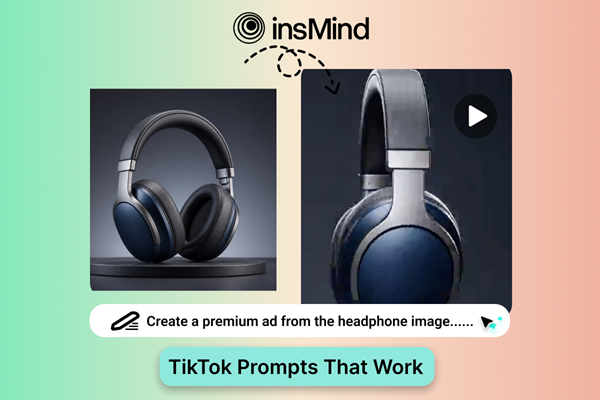
TikTok prompts work best when they are built around a fast visual payoff. A strong prompt should make the opening obvious, give the AI one main action to animate, and leave room for captions, or trend edits after generation.
This guest post turns the original list into a cleaner prompt bank for creators, brands, and ecommerce teams. You can test the ideas with AI video prompts or adapt them inside a TikTok video generator when you want a more TikTok-focused output.
What Makes a Good TikTok Video Prompt?
- A clear hook that viewers understand in the first second.
- One subject and one visible action, instead of several competing ideas.
- A style cue such as UGC, product ad, street interview, beauty demo, or meme edit.
- A vertical format and a short ending moment that works as a loop or CTA.
How to Use TikTok Video Prompts with insMind
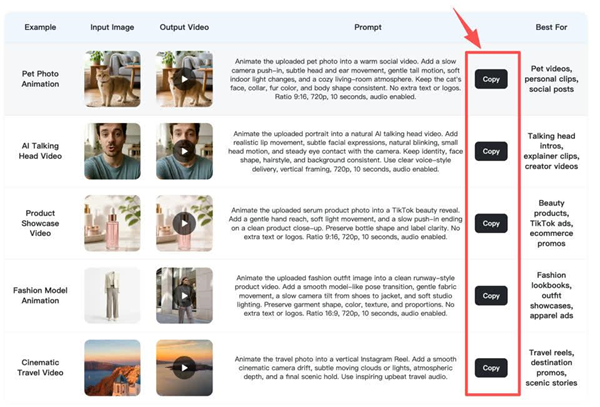
Step 1: Enter a Prompt or Select a Video Example
Choose a prompt idea or start from a visual example. Keep the first version compact so the AI can focus on the main action.
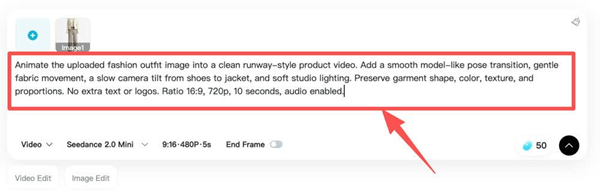
Step 2: Copy or Customize the Prompt
Replace the product, creator, setting, and tone with your own details. Keep the hook intact if the structure already works.
Step 3: Generate the Video
Generate the clip and watch the first two seconds carefully. If the hook is not clear, simplify the prompt before changing the style.
Step 4: Download Your Video
Download the best result and finish it with TikTok-native edits such as captions, sound, speed changes, or a quick CTA.
30 TikTok Prompts to Copy and Remix
- A skincare serum glides across a bathroom counter while water droplets sparkle, soft UGC beauty lighting, quick close-up hook.
- A sneaker spins on a sidewalk, then lands beside a fast outfit transition, energetic streetwear edit, handheld camera feel.
- A coffee cup fills itself in a cozy kitchen, steam forms a heart, warm morning vlog style.
- A phone case survives a dramatic drop test in slow motion, bold product-demo angle, quick reaction cut.
- A creator points to floating captions while a room transforms from messy to aesthetic, fast before-and-after pacing.
- A dog wearing a tiny backpack walks toward the camera like a travel influencer, bright lifestyle tone.
- A lipstick shade changes with every snap, clean beauty tutorial framing, satisfying transition.
- A meal kit assembles itself on a table, overhead camera, quick recipe reveal.
- A backpack opens and school supplies pop into place, back-to-school ad style, playful timing.
- A fitness bottle rolls into a gym scene and lights up with motion lines, motivational edit.
- A mini desk setup transforms into a productivity station, smooth zoom, cozy lighting.
- A travel suitcase opens and releases tiny landmarks, vertical travel ad look.
- A hoodie changes color as the model turns, fashion try-on style, crisp studio lighting.
- A candle flame becomes a ribbon of light, calming wellness aesthetic, slow push-in.
- A snack bag opens and the chips arrange into a smile, fun food-brand tone.
- A plant grows around a phone showing a wellness app, clean lifestyle visual, soft daylight.
- A pet portrait turns into a playful animated clip, bright home setting, gentle motion.
- A makeup brush sweeps across the frame and reveals a finished look, beauty transition edit.
- A toy robot explores a desk like a city, macro camera, playful creator vibe.
- A book opens and the cover world becomes a short fantasy scene, cinematic reveal.
- A water bottle follows a runner through sunrise streets, sporty handheld energy.
- A tote bag packs itself for a weekend trip, casual fashion-lifestyle style.
- A product box unwraps itself with floating ribbons, premium launch video look.
- A chef tosses ingredients that land perfectly in a bowl, fast food content pacing.
- A pair of headphones releases colorful sound waves, sound promo style, rhythmic cuts.
- A creator holds a blank sign that fills with a bold offer, UGC ad format, direct camera look.
- A cat sits at a laptop like a busy founder, funny office meme tone.
- A perfume bottle appears inside a glowing city night scene, luxury close-up lighting.
- A classroom drawing turns into a 3D explainer, educational TikTok style.
- A simple logo forms from paper cutouts, clean brand reveal, stop-motion feel.
Prompt Categories That Usually Perform Well
- Product demos that show a benefit instead of only showing packaging.
- Creator-style clips with a relatable setup and a visual payoff.
- Pet, food, travel, and beauty ideas with simple movement.
- Trend-inspired clips where the visual idea is clear even without sound.
If your TikTok starts from a product image or creator photo, i2v2 gives the AI a stronger visual reference than text alone. For broader short-form drafts, an AI video generator can help you explore several styles.
Common Mistakes to Avoid
- Trying to combine a product demo, story scene, and trend parody in one short prompt.
- Forgetting to specify vertical composition or TikTok-style pacing.
- Using a long caption idea as the whole prompt instead of describing the visual action.
Frequently Asked Questions
What is a TikTok video prompt?
It is a short instruction that tells an AI video model what scene to create, how it should move, and what style should shape the clip.
Can businesses use AI-generated TikTok videos?
Yes. Businesses can use AI clips for ad tests, product concepts, social hooks, and campaign drafts, as long as the final content matches brand and platform rules.
Start Creating TikTok Videos Today
The best TikTok prompts are clear, fast, and easy to customize. Pick one visual hook, describe the action, generate a draft, and keep refining until the first second earns attention.