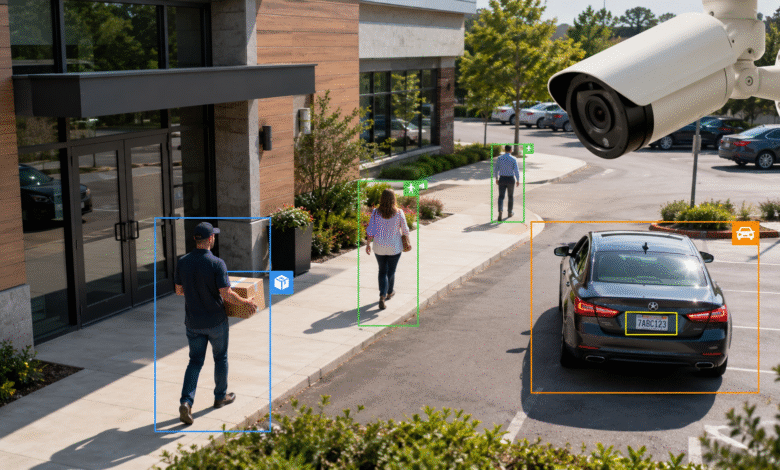
Surveillance has changed from simple video recording into active visual intelligence. A basic IP camera can now do much more than capture footage. When connected to the right analytics platform, it can detect people, classify objects, track vehicles, identify license plates, and trigger real-time alerts. This shift matters because many organizations already have camera networks in place, but they do not always use the full value of the video they collect.
Surveillance analysis of people and objects using generic IP cameras makes modern monitoring more practical and cost-effective. Instead of replacing every camera with expensive proprietary hardware, organizations can connect existing video streams to software that performs intelligent analysis. Retail stores, warehouses, parking areas, gated communities, offices, transport hubs, schools, and industrial sites can all benefit from this approach when it is used responsibly and legally.
What Surveillance Analysis Means in Modern Camera Systems
Surveillance analysis is the process of turning ordinary video footage into structured information. Traditional CCTV shows what happened, but modern analytics can help explain what is happening, where it is happening, and what action may be needed. The system watches for defined events such as a person entering a restricted area, a vehicle stopping too long, an object being left behind, or a license plate appearing on a watchlist.
Generic IP cameras are central to this model because they are widely available, affordable, and already installed in many locations. These cameras often stream video through common protocols such as RTSP or through a video management system. Once that stream reaches an analytics engine, the software can process frames, detect visual patterns, and create alerts or searchable records.
This approach moves surveillance away from passive recording. Instead of asking security staff to review hours of footage, analytics can highlight relevant moments. That improves response time, reduces workload, and makes recorded video easier to search during investigations.
How Generic IP Cameras Become Smart Surveillance Tools
A generic IP camera usually captures video, compresses it, and sends it over a network. By itself, it may only provide basic motion detection, which often creates false alerts from shadows, rain, insects, headlights, or moving tree branches. Intelligent surveillance analysis adds a software layer that can recognize meaningful visual categories.
For example, the system can distinguish between a person and a vehicle. It can detect whether movement happens inside a selected area, whether a car crosses a virtual boundary, or whether a person remains in one place longer than expected. This gives the camera a practical purpose beyond recording.
The process normally includes video input, frame analysis, object detection, event classification, storage, search, and alerting. Video comes from the camera or VMS. The analytics engine processes the stream. The system applies rules. Relevant events are saved with metadata such as time, camera name, object type, direction of travel, and snapshot. Users can then search, review, export, or respond.
People Detection and Human Movement Tracking
People detection is one of the most valuable uses of modern surveillance analysis. It allows a system to recognize human presence in a camera view and follow movement across a defined scene. This is useful for both security and operations.
In a retail store, people detection can help measure foot traffic, identify busy zones, and understand how customers move through aisles. In an office or industrial facility, it can support restricted area alerts, after-hours monitoring, and safety compliance. In a public venue, it can help teams notice unusual crowding or movement near sensitive areas.
Human tracking also helps reduce false alarms. A basic motion sensor may react to anything that changes in the image. A person detection model focuses only on human shapes and movement patterns. This makes alerts more relevant and easier for operators to trust.
Object Detection for Security and Operations
Object detection expands surveillance beyond people. A system can identify vehicles, bags, boxes, equipment, bicycles, forklifts, carts, or other selected object classes depending on the model and configuration. This creates many practical use cases.
In a warehouse, object detection can help monitor loading bays, delivery zones, and equipment movement. In a parking area, it can help count vehicles, spot unusual stopping behavior, or support entry and exit records. In a store, it can help observe abandoned carts, queue length, display interaction, or blocked walkways.
Object detection works best when the system focuses on specific goals. A camera at a loading dock may need to detect trucks and people. A camera at a building entrance may need to detect visitors, packages, and vehicles. A camera over a parking lot may need to detect cars, direction of travel, and license plates. The right use case makes analytics more reliable and easier to manage.
License Plate Recognition and Vehicle Monitoring
License plate recognition is a major part of intelligent surveillance. Also called ALPR or ANPR, this technology detects a vehicle plate in the video, reads the characters, and stores the result with time, location, and image evidence. It can work for moving vehicles, parked vehicles, access lanes, parking lots, checkpoints, and private roads when the camera position and lighting are suitable.
For businesses, license plate recognition can support parking access, visitor management, fleet tracking, delivery verification, and security investigations. A logistics facility can confirm when a truck entered or left. A residential community can identify registered vehicles. A commercial parking operator can match entry and exit events. A security team can search for a plate after an incident.
Good license plate analysis depends on camera angle, distance, shutter speed, lighting, and image clarity. A camera should face the plate at a useful angle, avoid heavy glare, and capture enough detail for the software to read characters. Even strong analytics software cannot fully compensate for a camera that is too far away, poorly focused, or pointed at harsh headlights.
How Systems Like SentiVeillance Cluster Make This Possible
Advanced surveillance analysis needs more than object detection. It needs video source management, rule creation, event review, watchlists, search tools, user permissions, and integration with other systems. Platforms such as Sentiveillance.com are built around this broader need, helping organizations turn camera feeds into actionable surveillance intelligence.
SentiVeillance Cluster is designed to connect and analyze video streams from generic IP cameras and cameras connected through supported video management environments. It can focus analysis on selected areas within each camera view, which helps the system look where events actually matter. This is useful when a single camera sees a road, sidewalk, entrance, and background area, but the security team only wants alerts from the driveway or doorway.
The platform also supports rules and event workflows. A user can define conditions that trigger alerts, such as a person appearing in a restricted zone, a license plate match, or a vehicle event in a selected camera area. These events can then be monitored, searched, filtered, and exported for reporting. To gain more information, users can review the cluster solution and its capabilities for multi-camera analysis, event management, and integrations.
Real-Time Alerts and Event-Based Monitoring
The biggest weakness of older CCTV is that it depends heavily on human attention. A person watching multiple screens can miss important details, especially during long shifts. Real-time event monitoring helps solve that problem by pushing relevant alerts to operators when predefined conditions occur.
A business can set an alert for a person entering a stockroom after hours. A parking facility can create an event when a specific license plate appears. A warehouse can generate a notification when a vehicle remains in a loading zone too long. A school or office can monitor exterior gates and restricted entries without requiring constant manual viewing.
Event-based monitoring does not remove the need for trained security staff. It supports them. The software narrows attention to moments that deserve review, while people still make judgment calls, confirm context, and decide the proper response.
Searchable Video and Faster Investigations
Finding a specific moment in recorded footage can be slow. Without analytics, an operator may need to scrub through hours of video from several cameras. Surveillance analysis changes that by attaching metadata to video events.
Instead of searching manually, users can filter by camera, time, object type, license plate, movement direction, rule, watchlist, or event category. This turns video into a searchable database. Investigators can quickly find when a vehicle entered the property, when a person crossed a boundary, or when an object appeared in a sensitive location.
This feature is valuable after incidents such as theft, vandalism, unauthorized access, workplace accidents, delivery disputes, or parking conflicts. Faster search reduces investigation time and helps teams provide clearer evidence.
Business Use Cases for Retail, Warehouses, and Offices
For small and mid-sized businesses, surveillance analysis can deliver value beyond security. Retailers can use people counting to understand peak hours, compare store entrances, measure queue pressure, and improve layout decisions. If a store knows which areas attract traffic and which areas customers ignore, it can adjust displays, staffing, and product placement.
Warehouses and logistics facilities can use camera analytics to improve safety and visibility. People and vehicle tracking can help monitor forklift zones, loading docks, gates, and restricted storage areas. Object detection can support operational awareness by identifying blocked paths, unusual vehicle presence, or activity outside scheduled hours.
Offices and commercial buildings can use surveillance analysis for access control support, lobby monitoring, visitor flow, parking oversight, and after-hours security. When integrated with alerts and user permissions, these systems help teams respond faster without constantly watching every camera.
Parking, Traffic, and Perimeter Security
Parking areas are one of the strongest use cases for surveillance analysis. License plate recognition can help automate entry records, identify unauthorized vehicles, support payment systems, and investigate damage claims. Vehicle detection can show occupancy, movement patterns, and unusual stopping behavior.
Traffic and perimeter monitoring benefit from similar tools. A camera near a gate can detect approaching vehicles, read plates, and trigger an event if a vehicle enters outside approved hours. A perimeter camera can alert when a person crosses a restricted line or remains near a fence. A loading area camera can identify whether a delivery vehicle arrived at the correct location.
These use cases work especially well when the camera view is designed for analytics. Clear lanes, controlled lighting, defined zones, and stable camera mounting improve accuracy. Planning the physical setup is just as important as choosing the software.
DIY and Budget-Friendly Surveillance Setups
Not every project begins with an enterprise budget. Many hobbyists and small businesses use generic IP cameras with open-source tools to build practical surveillance analysis systems. Common setups may include RTSP camera streams, a local network video recorder, Home Assistant integration, Frigate NVR, and hardware accelerators such as Google Coral USB for local machine learning.
The appeal of a budget-friendly setup is control. Video can be processed locally, reducing dependence on cloud platforms. Users can define detection zones, tune alerts, and integrate notifications with smart home or business systems. For simple people and object detection, this can be powerful enough for homes, small shops, garages, workshops, and small offices.
However, DIY systems require technical skill. Users need to understand camera networking, storage, model settings, lighting, privacy controls, and update management. A professional platform may be a better choice when the organization needs multiple users, license plate recognition, watchlists, auditability, centralized management, and reliable support.
Edge Processing vs Cloud Processing
Surveillance analytics can run on local hardware, cloud servers, or a hybrid setup. Edge processing means the video is analyzed near the camera or on a local server. This can reduce bandwidth, lower cloud storage needs, and improve privacy because raw video does not always need to leave the site.
Cloud processing can make deployment easier and provide scalable compute power, but it may raise concerns about data transfer, storage policies, latency, and compliance. Businesses must know where video is processed, who can access it, how long it is retained, and how it is protected.
For many surveillance projects, local or hybrid processing offers a practical balance. The system can process important events locally, send alerts, and store only relevant clips or metadata. This approach is especially useful for organizations that want smarter monitoring without sending every camera feed to an outside platform.
Privacy, Compliance, and Responsible Use
Surveillance analysis must be handled carefully. The same tools that improve safety can also raise privacy concerns if they are deployed without clear rules. Responsible use starts with a legitimate purpose, proper signage where required, limited access, secure storage, and retention policies that match business needs and legal obligations.
Organizations should avoid collecting more data than necessary. If the goal is people counting, the system may not need to identify individuals. If the goal is parking management, license plate records should be protected and retained only as long as needed. If watchlists are used, they should be carefully controlled, reviewed, and limited to authorized purposes.
Privacy-friendly features can include role-based access, event logs, face blurring, restricted exports, local processing, encrypted storage, and regular audits. A surveillance system should protect people as well as property.
Common Challenges and How to Solve Them
Camera analytics can fail when video quality is poor. Low resolution, bad night vision, incorrect angles, motion blur, glare, and unstable mounting can reduce detection accuracy. License plates are especially sensitive to camera placement because small text must be captured clearly.
False alerts are another challenge. A system may trigger too often if zones are too broad, sensitivity is too high, or rules are poorly defined. The solution is to narrow detection areas, choose specific triggers, test during real operating conditions, and review event history.
Network and storage planning also matter. Multiple IP cameras can generate significant bandwidth and video storage requirements. A good deployment plan should define resolution, frame rate, retention period, event recording rules, backup needs, and user access. The goal is not to record everything forever. The goal is to capture useful evidence and reliable events.
Future Trends in Surveillance Analysis
The next generation of surveillance analysis will be more contextual. Systems are moving from simple motion detection toward behavior-aware monitoring, multi-camera tracking, and more accurate classification. Lightweight models can run on edge devices, while larger systems can coordinate multiple cameras across a site.
Future platforms may become better at object handoff, where a person or vehicle detected by one camera can be associated with movement across another camera. Search tools may also become more natural, allowing operators to find events by describing what they need, such as a white van entering the north gate after 8 p.m. or a person carrying a box near the rear exit.
The value will come from practical accuracy, not hype. Businesses need systems that reduce noise, protect privacy, integrate with existing tools, and help staff make faster decisions.