
To identify the right UK-peptides.io product listing, open the individual product page and compare its full name, distinguishing label, listed amount and pack contents with your purchase brief. Record the SKU if one is shown. A search match is only a starting point: two listings can share most of a name yet refer to different compounds, variants or amounts. Make the same checks again in the basket before checkout.
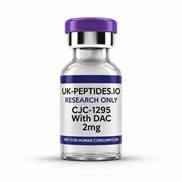
CJC-1295 with DAC 2 mg catalogue illustration from UK-peptides.io.
Start with the exact name, not the family name
Use UK Peptides as the site entry point and Peptides UK to open the catalogue. Search for the full compound name as it appears in your written specification. A short name can help find a product family, but it cannot tell you which entry within that family is intended. If the search brings up several close matches, open them in separate tabs and compare their full titles and descriptions.
Pay particular attention to the words that come after a shared name. A suffix or qualifier can identify the intended material, whereas a milligram figure can distinguish amounts of the same named material. If your brief does not say which variant is required, resolve that omission with whoever supplied the brief before ordering. Do not choose by closest spelling, smallest pack or lowest headline price while the identity is still unclear.
Compare the variant and amount separately
The CJC-1295 With DAC 2mg listing is a useful example of how to read a title. It identifies the variant as with DAC and the catalogue amount as 2mg. Its description distinguishes the same variant at 5mg from a separately designated MOD GRF 1–29 without-DAC listing. The first comparison is about amount within the same designation. The second is about a different designation, even where both titles show 2mg.
Another example in the UK Peptides FAQs is Ipamorelin: 2mg and 5mg are separately labelled catalogue formats. If a request specifies the 2mg format, finding the correct compound name on a 5mg page is only a partial match. These examples illustrate how listings are named; they do not establish whether a particular format is suitable for a project.
Check what the amount and quantity describe
A value in milligrams describes mass. It is not a concentration, and the number alone does not tell you whether it describes one unit or the contents of a pack. Read the item description for what is supplied, how the amount is presented and whether any format options are offered. If the description does not answer a requirement in your brief, leave that requirement unresolved until it is confirmed.
The basket quantity is a separate field. Ordering two units of a listing is not the same instruction as selecting one unit of a listing with twice the labelled mass. The total mass might match, but the number of catalogue units and the amount in each can differ. Check both fields if you are ordering against a request that specifies individual units or packs.
Read supply and bundle listings in the same way. A laboratory supply can be a separate item even if its name is associated with a compound listing or the shop displays it nearby. Treat a component as included only when the product page lists it among the contents. If your brief specifies a pack, check its contents one by one before deciding whether the pack meets it.
Use the SKU to record what you selected
A SKU is the seller’s stock-keeping code. On the CJC example above, the 2mg with-DAC page shows SKU UKPIO-P-68. If you are preparing a purchase request or asking someone else to review the selection, record the complete listing title, the SKU as shown and the product page address. The title explains what you selected; the code and page help another person return to the same listing. A SKU is not a batch or lot number and does not, on its own, establish product contents or a specification.
For a repeat purchase, compare the old confirmation or procurement note against the current page. If the code, title, variant or amount differs, check which detail changed before treating the listing as a replacement. A screenshot can help explain what you saw at the time, but use the current product page and basket for the details of the order you are placing now.
Do one final check in the basket
Compare each basket line with the request: full name, distinguishing label, listed amount, pack or unit and basket quantity. If the basket abbreviates a title, reopen the individual listing rather than guessing from the shortened text. If you need help, give the seller the full name, listed amount and SKU if shown. When comparing two entries, identify both and ask about the one detail that is unclear.
Frequently asked questions
Can two listings have the same amount but refer to different products?
Yes. The amount is only one part of the listing. Check the full compound name and designation first, then the amount and pack details.
Is the SKU enough to verify a listing?
It helps distinguish catalogue entries, but it should be checked against the product title and description. If the code matches but a required detail is missing or inconsistent, ask for clarification before ordering.