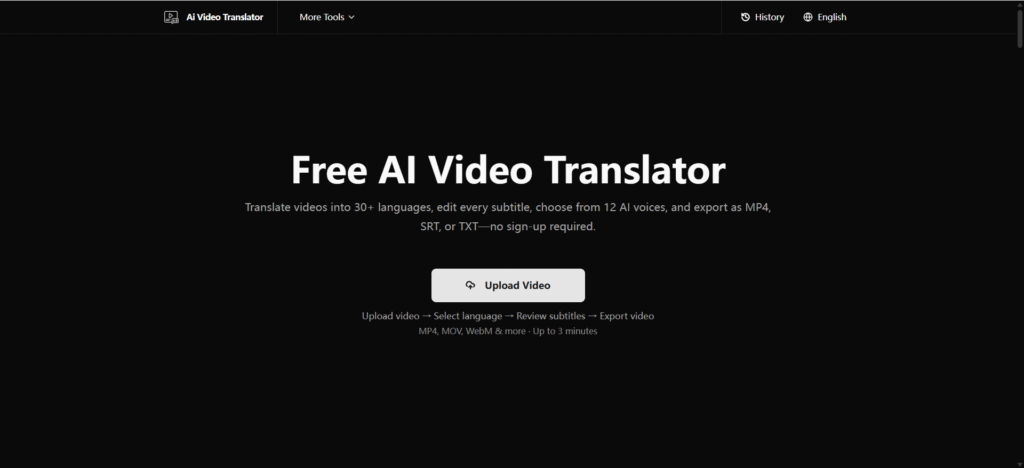
English is the language most people ask for when a video is not in one they read. The cleanest route is a translator that reads the clip’s audio and writes English for you. The tool we keep coming back to is AI Video Translator: free, browser-based, and no sign-up required. You upload a short video and get English subtitles, a transcript, or a dubbed file. This guide covers the fastest method, the output choices, and how to clean up the result before anyone else sees it.
Why Translate Video to English
The ask shows up everywhere. International students bring lectures into English to keep up in class. Small teams study US-market competitors. Researchers read conference talks that were only ever subtitled in the original language. In each case the goal is understanding, not a word-perfect dub. A clear English draft gets you there. 📚
Three Ways to Get an English Version
- YouTube’s captions. Fast for viewing, but only when English captions exist, and you rarely get a file.
- A browser extension. Handy inside the player, yet limited in what you can export and keep.
- An upload-based translator. Works from the audio itself and gives you real files you control.
Think about the end goal before picking. If you only need to follow one clip tonight, YouTube’s captions might do it. If you plan to keep the file, edit it, or send it to someone, the upload method is the safer bet. 🔍
The Fastest Free Method
Step 1: Prepare the clip
Save the video to your device and trim it to three minutes or less. A longer talk can be split into segments. Keep the picture track, since the tool needs video, not bare audio.
Step 2: Upload and set English
Open the translator and drop in the file. It accepts MP4, MOV, WebM, OGG, FLV, MPEG, and MPG. Set English as the target language. Want a dubbed file? Choose one of the 12 AI voices.
Step 3: Review and export
Open the subtitle editor, read the English text, fix names or terms, then export. You can grab the dubbed MP4, the SRT subtitles, or the TXT transcript. 🎯
Subtitles vs Dubbed English
Which output you keep depends on who is watching and where.
| Output | What it is | Best when |
| SRT subtitles | Timed English text | Uploading to YouTube or reading along |
| TXT transcript | Plain English text | Notes, study, or hand editing |
| Dubbed MP4 | English voice over the video | Sharing with viewers who will not read |
Most learners do best with subtitles plus the TXT. The text gives something to study; the timed captions tie meaning to the scene. The dub is a bonus for when reading is not practical, like on a commute. 🎧
Translating From a Specific Language
The workflow is the same whether the source is Spanish, German, Japanese, or Russian. You set the target to English and let the tool detect and transcribe the source speech. For Spanish specifically, a clip translated to English tends to be the most common request, and short, clear audio gives the cleanest English. Trim to the core segment and skip parts with loud music. 🌐
German and Russian clips often carry longer sentences, so the transcript reads better when you keep one idea per subtitle. Japanese and Korean rely on context the audio alone may not carry, so a quick manual pass on the TXT catches dropped pronouns.
Quality Check Before You Publish
- Read the transcript for odd names or niche words, and fix them by hand.
- Confirm the dubbed voice fits your audience; a calm voice reads more cleanly.
- Check the subtitles line up with the speech.
- Remember there is no lip-sync, so the face stays original. ⚠️
A small trick: play the dubbed file once with your eyes closed. You catch unclear phrases you might skip while watching the picture. Thirty seconds of listening improves the result more than a second pass over the subtitles.
Common English Translation Errors
A few mistakes repeat across English translations, and most are easy to catch. Proper nouns get mangled first: brand names, place names, and technical terms the model has not seen in your context. Read the TXT and fix them by hand. The second is tone. Casual speech translated literally can read stiff, so a light edit of the subtitle text keeps it natural without changing meaning. The third is timing. If a sentence runs long, split the subtitle so viewers can read it before the scene moves on. None of these need the original language. Your eyes and a quick listen handle them. 📝
FAQ
How do I translate a video to English?
Upload the clip to a translator, set English as the target, and export. You get English subtitles or a dubbed MP4 with one of 12 AI voices.
What does “translate video to English subtitles” mean?
It means producing a timed English caption file (SRT) from the video’s audio, which you can upload to YouTube or burn into the clip.
How do I translate a Spanish video to English?
Upload the Spanish clip, set English as the target, review the translation in the editor, and export subtitles or a dubbed file. Clear audio gives the best result.
How do I translate video to English?
Save the clip, upload it to a free translator, choose English, and download the output. No software and no account needed.
Can Google Translate a video?
Not directly. Google Translate handles text and short audio, not a full video file. For a clip you need a translator that reads the video itself.
The Takeaway
The best way to translate video to English in 2026 is the one that reads the audio, lets you edit, and asks for nothing up front. AI Video Translator does that for free, in the browser, with no sign-up. One clip is all it takes to see the gap close. 🚀