
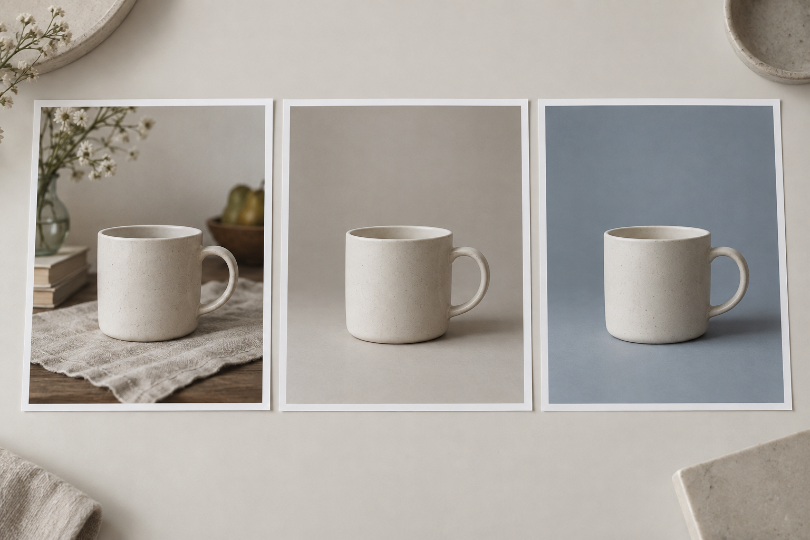
Two edited pictures sit side by side. One has a cleaner background, warmer light, and a closer crop; the other keeps more of the original scene. Picking a favorite is easy. Explaining which instruction improved the result is harder, because several things changed at once. You might repeat the new wording next time without knowing whether it helped, or whether the closer crop did most of the work.
A useful comparison with an AI Photo Editor begins with a narrower question. Choose one visible problem and keep the starting photograph fixed. Then compare requests that differ in a way you can name, rather than comparing two unrelated attractive outcomes.
This is a practical method for learning what to try next, not a laboratory benchmark or proof that one tool is universally better. It is especially useful when a creator keeps rewriting a prompt but cannot tell whether the new wording is helping.
Choose One Visible Problem Before Writing The Request
Start by pointing to something in the source photograph. Perhaps a patterned background makes a ceramic mug difficult to distinguish. That is more useful than a broad aim such as making the image professional, because you can inspect whether the mug has become easier to see.
Write a short acceptance condition in ordinary language. For the mug, it might be that the handle remains clearly separated from the background while the mug’s shape stays unchanged. Keep that condition visible during the comparison so that a striking color does not quietly become the new goal.
PicEditor AI follows an upload, modification choice, and instruction workflow for photo changes. That gives you a source and a request to keep track of. Record the chosen operation as well as the words, because a change of editing route is another difference between attempts.
Decide what must remain stable in the image. The handle, rim, and angle of the mug might matter more than a small background shadow. Naming those details prevents a visually pleasing result from passing simply because it solved one problem by changing the subject.
Keep The Source Fixed And Change One Instruction
Use the same source file for both candidates. Keep its crop and orientation unchanged. If the second attempt begins with an already edited image, it answers a different question: what happens when another modification is applied to that result?
For a first comparison, request the same plain background with two different levels of description. One request might ask for a simple gray background. The other might add that the background should stay visually quiet around the handle. The added instruction is then the difference you are trying to evaluate.
A photo editing tool comparison becomes less informative when the second request also changes the lighting, camera angle, and surface material. Those changes may be worth exploring later, but they make it difficult to connect the outcome to a particular part of the wording.
Keep the selected settings the same where the workflow allows it, and note anything you cannot hold constant. If you switch the editing operation or choose a different model, record that as a separate comparison rather than attributing the difference to the prompt alone. Do not assume that identical wording produces identical images. Generative variation can still affect a pair of results even when you have carefully limited the intended difference.
PicEditor AI can supply the candidate edits for this exercise. The comparison itself can be kept in a simple folder with the source, requests, and outputs. There is no need to assume the product includes a dedicated experiment log, a fixed seed, or a built-in side-by-side testing system.
Give the files names that let you reconnect each output to its request. You should be able to return later and identify which words were used without relying on memory. That record becomes particularly useful when one result looks better but the reason is not immediately obvious.
Judge Both Results Against The Same Visible Detail
Open the candidates at the same display size. Look first at the detail named in the acceptance condition, not at the whole image’s appeal. For the mug, inspect the space inside the handle and the contrast around its outer edge.
An AI Photo Editor result may improve that contrast while altering the handle’s shape. Keep those observations separate. The request may have helped with background clarity, yet the candidate may still be unsuitable because it changed an important part of the subject.
Compare each output with the source, rather than judging only one output against the other. Two candidates can share the same mistake. If both have narrowed the mug’s rim, their agreement does not make that change faithful to the photograph.
Use a photo editing tool result as evidence for the specific decision in front of you. “The handle is easier to distinguish in this candidate” is a defensible observation. “This wording always produces accurate product images” goes far beyond what a single pair can show.
Write a brief note separating the intended improvement from unwanted changes. You might keep the more specific background instruction while deciding that neither current output is ready to use. That is still a useful result: the exercise has clarified what to retain and what needs another attempt.
Only after that inspection should you judge the overall composition in its destination. A candidate that meets the narrow condition may still be a poor fit for a banner or a small card. Treat that as a second decision, so it does not erase what the first comparison actually taught you.
Try Another Example Before Calling The Method Reliable
If the wording seems promising, try it with another source that presents a related difficulty. A pale mug against a light background is a different challenge from a dark mug against a busy pattern. The second example can reveal whether the useful instruction was too closely tied to the first photograph.
Keep the follow-up modest and record failures as carefully as successes. If a request clarifies the background but repeatedly distorts a thin handle, that tradeoff matters. Selecting only the most flattering output would hide information you need when deciding whether to reuse the approach.
Do not treat a handful of examples as a measured success rate. They can guide your own workflow and identify a question worth testing more carefully. They cannot establish broad performance claims about every image, editing operation, or future product version.
Save The Useful Instruction With The Photograph It Helped
PicEditor AI can support a more deliberate editing process when you begin with a clear source and a visible problem. A fixed-source comparison helps you learn from the generated candidates instead of simply collecting them. It works best for a narrow decision whose improvement you can inspect directly.
Keep the source, the accepted wording, and a note about its limits together. The next time you face a similar image, you will have a starting point and a detail to check. A preferred result becomes more useful when you know what changed and what still needs your judgment.