Choosing the right motherboard depends on matching your CPU socket, RAM needs, and case size (ATX or Micro-ATX) to your daily performance goals.
To build a reliable computer, you must balance budget with future upgrades, ensuring your power delivery and storage expansion slots fit your gaming or office needs. By exploring reliable motherboard options and purchasing one, you prevent system crashes, maximize component speeds, and create a long-lasting PC.
What is a Motherboard?
A motherboard is the main circuit board inside a computer that connects all the parts together, like a city’s highway system.
Imagine your computer is a human body. The processor (CPU) is the brain, doing all the thinking. But the brain can’t move legs or blink eyes without a nervous system.
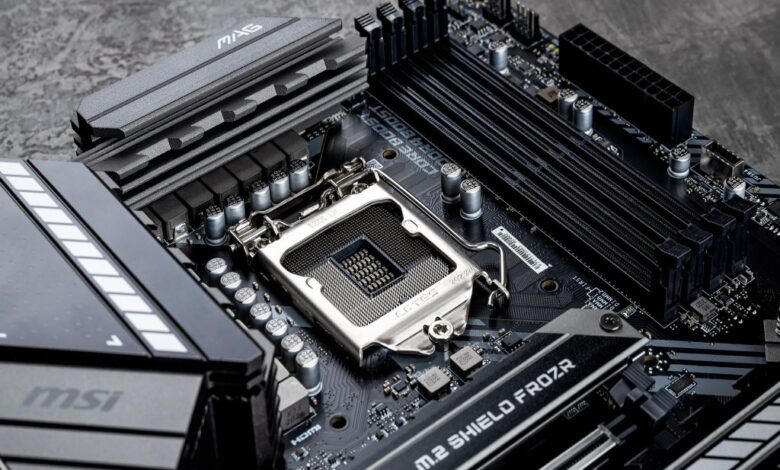
The motherboard is that nervous system. It is a large, flat board covered in lines and plugs. Every single part of your computer plugs into it:
- The power supply gives it juice.
- The brain (CPU) sits right in the middle.
- The memory (RAM) chips click into the sides.
Without it, you just have a pile of expensive metal blocks. It lets the parts talk to each other so you can watch videos, play games, or write emails.
Why Choosing the Right Motherboard Matters
The right motherboard keeps your computer fast, cool, and ready for future upgrades without breaking.
Think of buying a motherboard like buying a house foundation. If you build a heavy, three-story house on a weak foundation, the house will sink.
If you buy a cheap, weak motherboard but put a super-fast gaming brain on it, your computer will get too hot and slow down.
According to industry tech builders, a bad motherboard is the number one cause of weird computer crashes that nobody can explain. Spending a little time to pick the right one saves you years of headaches.
Step 1: Check the Socket
A socket is the specific slot on the motherboard where the CPU chip plugs in; it must match your CPU brand exactly.
You cannot just buy any brain and drop it into any board. The chip has to fit perfectly. There are two main companies that make computer brains: Intel and AMD.
They change their socket shapes every few years.
- An Intel chip will not fit into an AMD board.
- An old Intel chip will not fit into a new Intel board.
Before you buy anything, look at the box of your CPU. It will say a code like “LGA 1700” or “AM5”. Your motherboard box must say the exact same code.
Step 2: Pick Your Size
Motherboards come in three main sizes: ATX (Large), Micro-ATX (Medium), and Mini-ITX (Small), which dictate the size of your computer case.
Motherboards come in different shapes and sizes, called “Form Factors.” The size determines how many extra parts you can fit and how large your computer’s box (case) needs to be.
| Motherboard Size | Best Used For | Number of Plugs | Room Needed |
| ATX (Large) | Heavy Gaming & Video Work | Lots (4+ slots) | Large Tower Case |
| Micro-ATX (Medium) | Budget Builds & Everyday Use | Medium (2-4 slots) | Medium Case |
| Mini-ITX (Small) | Tiny Desks & Portable PCs | Few (1-2 slots) | Very Small Case |
For most beginners, a Micro-ATX board is the sweet spot. It is cheaper, fits in normal boxes, and has plenty of slots for everyday users.
Step 3: Memory and Storage Slots
Look for a motherboard with 4 RAM slots and at least two M.2 storage slots for maximum speed.
RAM is your computer’s short-term memory. It helps you keep 20 internet tabs open at once without the computer freezing. Look for a board with four RAM slots if you can. Even if you only use two slots today, you can buy more memory later and click it in.
For long-term storage (where you save your photos and games), look for M.2 slots. These are small slots where tiny, fast storage sticks plug directly into the board. They are way faster than old-fashioned, hard, heavy drives with spinning disks.
Matching the Board to Your Daily Needs
Choose a budget board for office work, a mid-range board for gaming, and a premium board for heavy video editing.
Let’s look at three real-life situations to see what you should buy:
The Homework and Office Worker
If you just want to type papers, check Facebook, and watch Netflix, you do not need to spend lots of money. A simple, budget Micro-ATX board is perfect. You don’t need fancy heat shields or extra plugs.
The After-School Gamer
If you love playing high-graphic games, you need a board that can handle heat. Look for boards with large metal blocks on them (called heatsinks). These blocks suck heat away from the board, preventing it from melting during long gaming sessions. Look for a reliable motherboard with “PCIe 4.0 or 5.0” slots so your graphics card can run at full speed.
The Content Creator
If you edit 4K videos or make music, you need to move giant files fast. You will want a premium ATX motherboard with built-in Wi-Fi 6E or Wi-Fi 7, and lots of USB ports on the back for cameras, microphones, and external hard drives.
Hidden Features to Watch Out For
Check for built-in Wi-Fi, Bluetooth, and pre-installed backplates to make building easier.
- Wi-Fi and Bluetooth: Some motherboards do not have built-in wireless connectivity. If you don’t want to run a long internet cable from your router to your bedroom, make sure the board says “Wi-Fi” in the name.
- The I/O Shield: the metal plate that covers the plugs on the back of your computer. Cheap boards make you snap this sharp piece of metal into the case manually. Nicer boards have it pre-installed, saving your fingers from getting cut!
Summary Checklist for Buyers
Use a simple checklist to match your CPU, budget, size, and Wi-Fi needs before checking out.
Before you click the buy button, run through this simple checklist:
- Does the socket match my CPU chip exactly?
- Will this size fit inside the computer case I bought?
- Does it have enough slots for my memory and storage?
- Does it have built-in Wi-Fi for wireless internet?
If you checked all four boxes, you have found the perfect match for your computer!